

Grundig Database Decode - Instant Radio Code Service
Audi Gamma CC
Grundig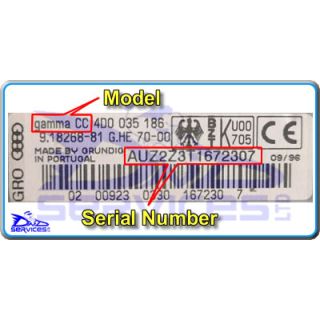
Code Entry as Follows:
Switch Radio On - Display Shows
" SAFE "
Press and Hold " DX " and " FM 1/2 "
Until " 1000 " Appears
(This may take up to 10 Seconds - be patient)
Press preset " 1 " repeatedly for 1st Digit
Press preset " 2 " repeatedly for 2nd Digit
Press preset " 3 " repeatedly for 3rd Digit
Press preset " 4 " repeatedly for 4th Digit
If the correct code number is now shown
Press and Hold " DX " and " FM 1/2 "
Until Code Enters
Citroen 2014 RDS
Grundig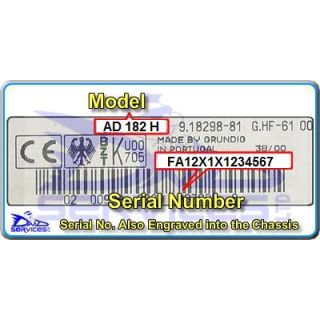
Code Entry as Follows:
Switch Radio On - Display Shows
" CODE " then " - - - - "
Press preset " 1 " repeatedly for 1st Digit
Press preset " 2 " repeatedly for 2nd Digit
Press preset " 3 " repeatedly for 3rd Digit
Press preset " 4 " repeatedly for 4th Digit
If the correct code number is now shown
Press " 6 " to Enter
Fiat AD 182 H
GrundigCode Entry as Follows:
Switch Radio On - Display Shows
" SAFE " and then " - - - - "
Press preset " 1 " repeatedly for 1st Digit
Press preset " 2 " repeatedly for 2nd Digit
Press preset " 3 " repeatedly for 3rd Digit
Press preset " 4 " repeatedly for 4th Digit
If the correct code number is now shown
Press " TP " to Enter
Fiat AD 185 H (B)
Grundig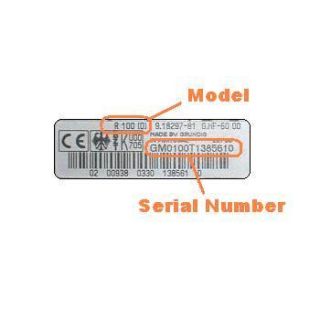
Code Entry as Follows:
Switch Radio On - Display Shows
" SAFE " and then " - - - - "
Press preset " 1 " repeatedly for 1st Digit
Press preset " 2 " repeatedly for 2nd Digit
Press preset " 3 " repeatedly for 3rd Digit
Press preset " 4 " repeatedly for 4th Digit
If the correct code number is now shown
Press " TP " to Enter
SAAB Smogen
Grundig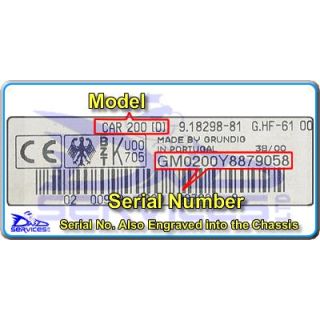
Code Entry as Follows:
Switch On Ignition (No Need To Start Engine)
Switch Radio On - Display Shows
" SAFE " And Then Shows " 10 - - - - "
Press preset " 1 " repeatedly for 1st Digit
Press preset " 2 " repeatedly for 2nd Digit
Press preset " 3 " repeatedly for 3rd Digit
Press preset " 4 " repeatedly for 4th Digit
If the correct code number is now shown
Press & Hold Preset " AS " Until the Unit Beeps
Seat Sound System 5201 RDS Infomat
Grundig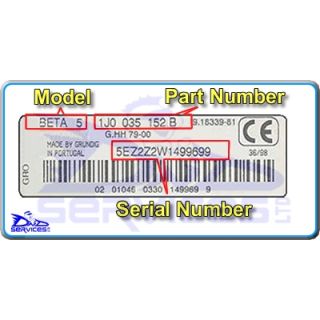
Code Entry as Follows:
Switch Radio ON
Display shows " SAFE " and then " 1 - - - "
Press preset " 1 " repeatedly for 1st digit
Press preset " 2 " repeatedly for 2nd digit
Press preset " 3 " repeatedly for 3rd digit
Press preset " 4 " repeatedly for 4th digit
If the Correct CODE is now shown
Press "LOUD/EXPERT" to Enter
Vauxhall R 100 (D)
GrundigCode Entry as Follows:
Switch On Ignition (No Need To Start Engine)
Switch Radio On - Display Shows
" SAFE " And Then Shows " 10 - - - - "
Press preset " 1 " repeatedly for 1st Digit
Press preset " 2 " repeatedly for 2nd Digit
Press preset " 3 " repeatedly for 3rd Digit
Press preset " 4 " repeatedly for 4th Digit
If the correct code number is now shown
Press & Hold Preset " AS " Until the Unit Beeps
Vauxhall SC 303 (C)
GrundigCode Entry as Follows:
Switch On Ignition (No Need To Start Engine)
Switch Radio On - Display Shows
" SAFE " And Then Shows " 10 - - - - "
Press preset " 1 " repeatedly for 1st Digit
Press preset " 2 " repeatedly for 2nd Digit
Press preset " 3 " repeatedly for 3rd Digit
Press preset " 4 " repeatedly for 4th Digit
If the correct code number is now shown
Press & Hold Preset " AS " Until the Unit Beeps
Vauxhall SC 303 (C)
GrundigCode Entry as Follows:
Switch On Ignition (No Need To Start Engine)
Switch Radio On - Display Shows
" SAFE " And Then Shows " 10 - - - - "
Press preset " 1 " repeatedly for 1st Digit
Press preset " 2 " repeatedly for 2nd Digit
Press preset " 3 " repeatedly for 3rd Digit
Press preset " 4 " repeatedly for 4th Digit
If the correct code number is now shown
Press & Hold Preset " AS " Until the Unit Beeps
Vauxhall SC 303 D (C)
GrundigCode Entry as Follows:
Switch On Ignition (No Need To Start Engine)
Switch Radio On - Display Shows
" SAFE " And Then Shows " 10 - - - - "
Press preset " 1 " repeatedly for 1st Digit
Press preset " 2 " repeatedly for 2nd Digit
Press preset " 3 " repeatedly for 3rd Digit
Press preset " 4 " repeatedly for 4th Digit
If the correct code number is now shown
Press & Hold Preset " AS " Until the Unit Beeps
Vauxhall SC 303 D (C)
GrundigCode Entry as Follows:
Switch On Ignition (No Need To Start Engine)
Switch Radio On - Display Shows
" SAFE " And Then Shows " 10 - - - - "
Press preset " 1 " repeatedly for 1st Digit
Press preset " 2 " repeatedly for 2nd Digit
Press preset " 3 " repeatedly for 3rd Digit
Press preset " 4 " repeatedly for 4th Digit
If the correct code number is now shown
Press & Hold Preset " AS " Until the Unit Beeps
VW Beta 4
Grundig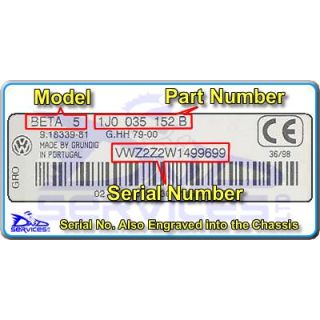
Code Entry as Follows:
Switch ON the Ignition (No need to start car)
Switch Radio On - Display Shows
" SAFE "
Press and Hold " TP " and " TA "
The Display will then show " 1000 "
(This may take up to 10 Seconds - be patient)
Press preset " 1 " repeatedly for 1st Digit
Press preset " 2 " repeatedly for 2nd Digit
Press preset " 3 " repeatedly for 3rd Digit
Press preset " 4 " repeatedly for 4th Digit
If the correct code number is now shown
Press and Hold " TP " and " TA " To Enter
VW Beta 4
GrundigCode Entry as Follows:
Switch ON the Ignition (No need to start car)
Switch Radio On - Display Shows
" SAFE "
Press and Hold " TP " and " TA "
The Display will then show " 1000 "
(This may take up to 10 Seconds - be patient)
Press preset " 1 " repeatedly for 1st Digit
Press preset " 2 " repeatedly for 2nd Digit
Press preset " 3 " repeatedly for 3rd Digit
Press preset " 4 " repeatedly for 4th Digit
If the correct code number is now shown
Press and Hold " TP " and " TA " To Enter
VW Beta 4
GrundigCode Entry as Follows:
Switch ON the Ignition (No need to start car)
Switch Radio On - Display Shows
" SAFE "
Press and Hold " TP " and " TA "
The Display will then show " 1000 "
(This may take up to 10 Seconds - be patient)
Press preset " 1 " repeatedly for 1st Digit
Press preset " 2 " repeatedly for 2nd Digit
Press preset " 3 " repeatedly for 3rd Digit
Press preset " 4 " repeatedly for 4th Digit
If the correct code number is now shown
Press and Hold " TP " and " TA " To Enter
VW Beta 4
GrundigCode Entry as Follows:
Switch ON the Ignition (No need to start car)
Switch Radio On - Display Shows
" SAFE "
Press and Hold " TP " and " TA "
The Display will then show " 1000 "
(This may take up to 10 Seconds - be patient)
Press preset " 1 " repeatedly for 1st Digit
Press preset " 2 " repeatedly for 2nd Digit
Press preset " 3 " repeatedly for 3rd Digit
Press preset " 4 " repeatedly for 4th Digit
If the correct code number is now shown
Press and Hold " TP " and " TA " To Enter
VW Beta 5
GrundigCode Entry as Follows:
Switch ON the Ignition (No need to start car)
Switch Radio On - Display Shows
" SAFE " and then shows " 1000 "
(This may take up to 10 Seconds - be patient)
Press preset " 1 " repeatedly for 1st Digit
Press preset " 2 " repeatedly for 2nd Digit
Press preset " 3 " repeatedly for 3rd Digit
Press preset " 4 " repeatedly for 4th Digit
If the correct code number is now shown
Press RH Tuning Button " >> " To Enter
VW Beta 5
GrundigCode Entry as Follows:
Switch ON the Ignition (No need to start car)
Switch Radio On - Display Shows
" SAFE " and then shows " 1000 "
(This may take up to 10 Seconds - be patient)
Press preset " 1 " repeatedly for 1st Digit
Press preset " 2 " repeatedly for 2nd Digit
Press preset " 3 " repeatedly for 3rd Digit
Press preset " 4 " repeatedly for 4th Digit
If the correct code number is now shown
Press RH Tuning Button " >> " To Enter
Your Cart
