

Blaupunkt Database Decode - Instant Radio Code Service
Rover CD32
Blaupunkt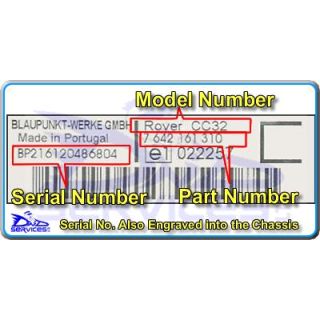
Code Entry as Follows:
Switch Radio On - Display Shows
" CODE " Then " 0000 "
Press preset " 1 " repeatedly for 1st Digit
Press preset " 2 " repeatedly for 2nd Digit
Press preset " 3 " repeatedly for 3rd Digit
Press preset " 4 " repeatedly for 4th Digit
If the correct code number is now shown
Press Tuning Up Button " ^ " To Enter
Rover XQE 100 380
Blaupunkt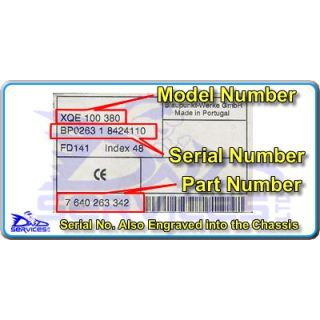
Code Entry as Follows:
Switch Radio On - Display Shows
" CODE - - - - "
Press preset " 1 " repeatedly for 1st Digit
Press preset " 2 " repeatedly for 2nd Digit
Press preset " 3 " repeatedly for 3rd Digit
Press preset " 4 " repeatedly for 4th Digit
If the correct code number is now shown
Press Tuning Up Button " > " To Enter
Rover XQE 100 380
BlaupunktCode Entry as Follows:
Switch Radio On - Display Shows
" CODE - - - - "
Press preset " 1 " repeatedly for 1st Digit
Press preset " 2 " repeatedly for 2nd Digit
Press preset " 3 " repeatedly for 3rd Digit
Press preset " 4 " repeatedly for 4th Digit
If the correct code number is now shown
Press Tuning Up Button " > " To Enter
Rover XQE 100 380
BlaupunktCode Entry as Follows:
Switch Radio On - Display Shows
" CODE - - - - "
Press preset " 1 " repeatedly for 1st Digit
Press preset " 2 " repeatedly for 2nd Digit
Press preset " 3 " repeatedly for 3rd Digit
Press preset " 4 " repeatedly for 4th Digit
If the correct code number is now shown
Press Tuning Up Button " > " To Enter
Rover XQE 100 380
BlaupunktPlease Note:
Your USA Radio with a 5 digit code needs
to be programmed using the 4 digit code
provided by following the procedure below.
Code Entry as Follows:
Switch on ignition
Switch Radio On - Display Shows
" CODE - - - - - "
Press and Hold “M” for six seconds
Until display shows “AREA + Your Country”
Press preset " 1 " repeatedly
To toggle through the regions
USA – CANADA – OC + RDS – JAPAN - EUROPE
Select “AREA EUROPE”
Turn OFF Radio
Switch Radio On - Display Shows
" CODE - - - - "
Enter your 4 digit code
Press preset " 1 " repeatedly for 1st Digit
Press preset " 2 " repeatedly for 2nd Digit
Press preset " 3 " repeatedly for 3rd Digit
Press preset " 4 " repeatedly for 4th Digit
If the correct code number is now shown
Press RH Tuning Button " > " To Enter
Radio is now on
Press and Hold “M” for six seconds
Until display shows “AREA EUROPE”
Press preset " 1 " repeatedly
To toggle through the regions
USA – CANADA – OC + RDS – JAPAN - EUROPE
Select “AREA + Your Country”
Turn OFF Radio
Radio can now be used as normal
Rover XQE 100 380
BlaupunktCode Entry as Follows:
Switch Radio On - Display Shows
" CODE - - - - "
Press preset " 1 " repeatedly for 1st Digit
Press preset " 2 " repeatedly for 2nd Digit
Press preset " 3 " repeatedly for 3rd Digit
Press preset " 4 " repeatedly for 4th Digit
If the correct code number is now shown
Press Tuning Up Button " > " To Enter
Rover XQE 100 380
BlaupunktCode Entry as Follows:
Switch Radio On - Display Shows
" CODE - - - - "
Press preset " 1 " repeatedly for 1st Digit
Press preset " 2 " repeatedly for 2nd Digit
Press preset " 3 " repeatedly for 3rd Digit
Press preset " 4 " repeatedly for 4th Digit
If the correct code number is now shown
Press Tuning Up Button " > " To Enter
Rover XQE 100 380
BlaupunktCode Entry as Follows:
Switch Radio On - Display Shows
" CODE - - - - "
Press preset " 1 " repeatedly for 1st Digit
Press preset " 2 " repeatedly for 2nd Digit
Press preset " 3 " repeatedly for 3rd Digit
Press preset " 4 " repeatedly for 4th Digit
If the correct code number is now shown
Press Tuning Up Button " > " To Enter
Rover XQE 100 380
BlaupunktCode Entry as Follows:
Switch Radio On - Display Shows
" CODE - - - - "
Press preset " 1 " repeatedly for 1st Digit
Press preset " 2 " repeatedly for 2nd Digit
Press preset " 3 " repeatedly for 3rd Digit
Press preset " 4 " repeatedly for 4th Digit
If the correct code number is now shown
Press Tuning Up Button " > " To Enter
Rover XQE 100 380
BlaupunktCode Entry as Follows:
Switch Radio On - Display Shows
" CODE - - - - "
Press preset " 1 " repeatedly for 1st Digit
Press preset " 2 " repeatedly for 2nd Digit
Press preset " 3 " repeatedly for 3rd Digit
Press preset " 4 " repeatedly for 4th Digit
If the correct code number is now shown
Press Tuning Up Button " > " To Enter
Skoda ACR
Blaupunkt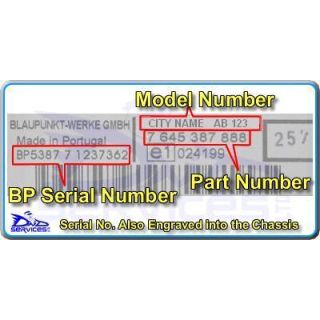
Code Entry as Follows:
Switch Radio On - Display Shows
" CODE "
Press Preset " 1 " and the display will show
" 0000 "
Press preset " 1 " repeatedly for 1st Digit
Press preset " 2 " repeatedly for 2nd Digit
Press preset " 3 " repeatedly for 3rd Digit
Press preset " 4 " repeatedly for 4th Digit
If the correct code number is now shown
Press RH Tuning Button " > " to Enter
Skoda ACR
BlaupunktCode Entry as Follows:
Switch Radio On - Display Shows
" CODE "
Press Preset " 1 " and the display will show
" 0000 "
Press preset " 1 " repeatedly for 1st Digit
Press preset " 2 " repeatedly for 2nd Digit
Press preset " 3 " repeatedly for 3rd Digit
Press preset " 4 " repeatedly for 4th Digit
If the correct code number is now shown
Press RH Tuning Button " > " to Enter
Skoda Casablanca
BlaupunktMaster Code Entry as Follows:
Insert Keycard
Switch Radio Off
Press and Hold Presets " FM T " & " 1 "
And Switch Radio On
Display will show " 0000 "
Press preset " 1 " repeatedly for 1st Digit
Press preset " 2 " repeatedly for 2nd Digit
Press preset " 3 " repeatedly for 3rd Digit
Press preset " 4 " repeatedly for 4th Digit
If the correct code number is now shown
Press Tuning Up Button " >> " To Enter
Skoda Casablanca
BlaupunktMaster Code Entry as Follows:
Insert Keycard
Switch Radio Off
Press and Hold Presets " FM T " & " 1 "
And Switch Radio On
Display will show " 0000 "
Press preset " 1 " repeatedly for 1st Digit
Press preset " 2 " repeatedly for 2nd Digit
Press preset " 3 " repeatedly for 3rd Digit
Press preset " 4 " repeatedly for 4th Digit
If the correct code number is now shown
Press Tuning Up Button " >> " To Enter
Skoda Verona
BlaupunktMaster Code Entry as Follows:
Insert Keycard
Switch Radio Off
Press and Hold Presets " FM T " & " 1 "
And Switch Radio On
Display will show " 0000 "
Press preset " 1 " repeatedly for 1st Digit
Press preset " 2 " repeatedly for 2nd Digit
Press preset " 3 " repeatedly for 3rd Digit
Press preset " 4 " repeatedly for 4th Digit
If the correct code number is now shown
Press Tuning Up Button " >> " To Enter
Suzuki Ignis
Blaupunkt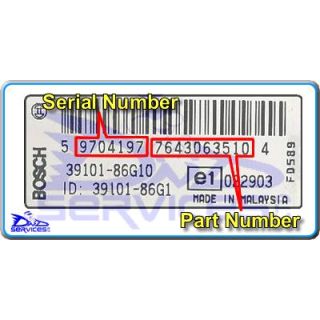
Code Entry as Follows:
Switch Radio On - Display Shows
" CODE "
Press and Hold "BAND"
The display will now show " 10 - - - - "
Press preset " 1 " repeatedly for 1st Digit
Press preset " 2 " repeatedly for 2nd Digit
Press preset " 3 " repeatedly for 3rd Digit
Press preset " 4 " repeatedly for 4th Digit
If the correct code number is now shown
Press and Hold "BAND" to Enter
Suzuki Ignis
BlaupunktCode Entry as Follows:
Switch Radio On - Display Shows
" CODE "
Press and Hold "BAND"
The display will now show " 10 - - - - "
Press preset " 1 " repeatedly for 1st Digit
Press preset " 2 " repeatedly for 2nd Digit
Press preset " 3 " repeatedly for 3rd Digit
Press preset " 4 " repeatedly for 4th Digit
If the correct code number is now shown
Press and Hold "BAND" to Enter
Suzuki Ignis
BlaupunktCode Entry as Follows:
Switch Radio On - Display Shows
" CODE "
Press and Hold "BAND"
The display will now show " 10 - - - - "
Press preset " 1 " repeatedly for 1st Digit
Press preset " 2 " repeatedly for 2nd Digit
Press preset " 3 " repeatedly for 3rd Digit
Press preset " 4 " repeatedly for 4th Digit
If the correct code number is now shown
Press and Hold "BAND" to Enter
Suzuki Ignis
BlaupunktCode Entry as Follows:
Switch Radio On - Display Shows
" CODE "
Press and Hold "BAND"
The display will now show " 10 - - - - "
Press preset " 1 " repeatedly for 1st Digit
Press preset " 2 " repeatedly for 2nd Digit
Press preset " 3 " repeatedly for 3rd Digit
Press preset " 4 " repeatedly for 4th Digit
If the correct code number is now shown
Press and Hold "BAND" to Enter
Vauxhall CAR 2003 (F)
Blaupunkt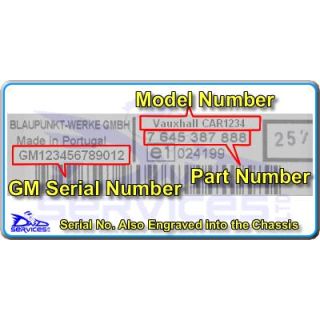
Code Entry as Follows:
Switch On Ignition (No Need To Start Engine)
Turn Radio OFF
Press & Hold Preset " AS " and
Switch Radio ON - Display Shows
" SAFE " And Then Shows " 10 - - - - "
Press preset " 1 " repeatedly for 1st Digit
Press preset " 2 " repeatedly for 2nd Digit
Press preset " 3 " repeatedly for 3rd Digit
Press preset " 4 " repeatedly for 4th Digit
If the correct code number is now shown
Press & Hold Preset " AS " Until the Unit Beeps
Vauxhall CAR 2003 (F)
BlaupunktCode Entry as Follows:
Switch On Ignition (No Need To Start Engine)
Turn Off Stereo
Press & Hold Preset " AS " and
Switch Radio On - Display Shows
" SAFE " And Then Shows " 10 - - - - "
Press preset " 1 " repeatedly for 1st Digit
Press preset " 2 " repeatedly for 2nd Digit
Press preset " 3 " repeatedly for 3rd Digit
Press preset " 4 " repeatedly for 4th Digit
If the correct code number is now shown
Press & Hold Preset " AS " Until the Unit Beeps
Vauxhall CAR 2003 (F)
BlaupunktCode Entry as Follows:
Switch On Ignition (No Need To Start Engine)
Turn Off Stereo
Press & Hold Preset " AS " and
Switch Radio On - Display Shows
" SAFE " And Then Shows " 10 - - - - "
Press preset " 1 " repeatedly for 1st Digit
Press preset " 2 " repeatedly for 2nd Digit
Press preset " 3 " repeatedly for 3rd Digit
Press preset " 4 " repeatedly for 4th Digit
If the correct code number is now shown
Press & Hold Preset " AS " Until the Unit Beeps
Vauxhall CAR 2003 (F)
BlaupunktCode Entry as Follows:
Turn Off Stereo
Switch On Ignition (No Need To Start Engine)
Press & Hold Preset " AS " and
Switch Radio On - Display Shows
" SAFE " And Then Shows " 10 - - - - "
Press preset " 1 " repeatedly for 1st Digit
Press preset " 2 " repeatedly for 2nd Digit
Press preset " 3 " repeatedly for 3rd Digit
Press preset " 4 " repeatedly for 4th Digit
If the correct code number is now shown
Press & Hold Preset " AS " Until the Unit Beeps
Vauxhall CAR 300
BlaupunktCode Entry as Follows:
Switch On Ignition (No Need To Start Engine)
Turn Off Stereo
Press & Hold Preset " AS " and
Switch Radio On - Display Shows
" SAFE " And Then Shows " 10 - - - - "
Press preset " 1 " repeatedly for 1st Digit
Press preset " 2 " repeatedly for 2nd Digit
Press preset " 3 " repeatedly for 3rd Digit
Press preset " 4 " repeatedly for 4th Digit
If the correct code number is now shown
Press & Hold Preset " AS " Until the Unit Beeps
Your Cart
