

Blaupunkt Database Decode - Instant Radio Code Service
Blaupunkt Woodstock DAB 54
Blaupunkt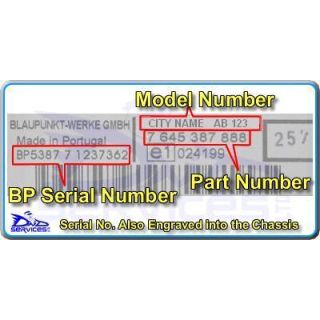
Master Code Entry as Follows:
Insert Blank Blaupunkt MMC Card
Switch Radio On - Display Shows
" KEYCARD NOT OK "
Turn Off Stereo
Press And Hold " BAND.TS " & " 1.SCL " And
Switch Radio On - Display Shows
" ENTER MASTER CODE "
" 0000 "
Press Tuning Up " ^ " For Correct Digit
Press Tuning Up Button " > " To Enter
Press Tuning Up " ^ " For Correct Digit
Press Tuning Up Button " > " To Enter
Press Tuning Up " ^ " For Correct Digit
Press Tuning Up Button " > " To Enter
Press Tuning Up " ^ " For Correct Digit
If the correct code number is now shown
Press " OK " To Enter
Blaupunkt Woodstock DJ
BlaupunktCode Entry as Follows:
Insert New Blank Keycard
Turn Off Stereo
Press And Hold Presets " 1 " and " FMT "
Switch Radio On - Display Shows
" 0000 "
Press preset " 1 " repeatedly for 1st Digit
Press preset " 2 " repeatedly for 2nd Digit
Press preset " 3 " repeatedly for 3rd Digit
Press preset " 4 " repeatedly for 4th Digit
If the correct code number is now shown
Press " >> " To Enter
And the Radio will then Turn On
Blaupunkt Woodstock DJ
BlaupunktCode Entry as Follows:
Insert New Blank Keycard
Turn Off Stereo
Press And Hold Presets " 1 " and " FMT "
Switch Radio On - Display Shows
" 0000 "
Press preset " 1 " repeatedly for 1st Digit
Press preset " 2 " repeatedly for 2nd Digit
Press preset " 3 " repeatedly for 3rd Digit
Press preset " 4 " repeatedly for 4th Digit
If the correct code number is now shown
Press " >> " To Enter
And the Radio will then Turn On
Blaupunkt Woodstock DJ
BlaupunktCode Entry as Follows:
Insert New Blank Keycard
Turn Off Stereo
Press And Hold Presets " 1 " and " FMT "
Switch Radio On - Display Shows
" 0000 "
Press preset " 1 " repeatedly for 1st Digit
Press preset " 2 " repeatedly for 2nd Digit
Press preset " 3 " repeatedly for 3rd Digit
Press preset " 4 " repeatedly for 4th Digit
If the correct code number is now shown
Press " >> " To Enter
And the Radio will then Turn On
Blaupunkt Woodstock DJ
BlaupunktCode Entry as Follows:
Insert New Blank Keycard
Turn Off Stereo
Press And Hold Presets " 1 " and " FMT "
Switch Radio On - Display Shows
" 0000 "
Press preset " 1 " repeatedly for 1st Digit
Press preset " 2 " repeatedly for 2nd Digit
Press preset " 3 " repeatedly for 3rd Digit
Press preset " 4 " repeatedly for 4th Digit
If the correct code number is now shown
Press " >> " To Enter
And the Radio will then Turn On
BMW Bavaria C RDS
Blaupunkt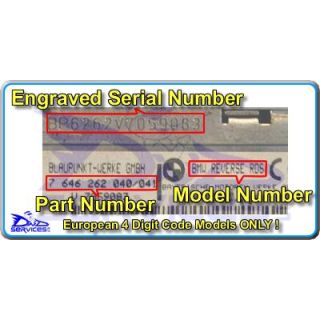
Code Entry as Follows:
Switch Radio On - Display Shows
" CODE "
Press preset " 1 " repeatedly for 1st Digit
Press preset " 2 " repeatedly for 2nd Digit
Press preset " 3 " repeatedly for 3rd Digit
Press preset " 4 " repeatedly for 4th Digit
If the correct code number is now shown
Press RH Tuning Button " > " To Enter
BMW Bavaria C Reverse RDS
BlaupunktCode Entry as Follows:
Switch Radio On - Display Shows
" CODE "
Press preset " 1 " repeatedly for 1st Digit
Press preset " 2 " repeatedly for 2nd Digit
Press preset " 3 " repeatedly for 3rd Digit
Press preset " 4 " repeatedly for 4th Digit
If the correct code number is now shown
Press RH Tuning Button " > " To Enter
BMW Bavaria C Reverse RDS
BlaupunktCode Entry as Follows:
Switch Radio On - Display Shows
" CODE "
Press preset " 1 " repeatedly for 1st Digit
Press preset " 2 " repeatedly for 2nd Digit
Press preset " 3 " repeatedly for 3rd Digit
Press preset " 4 " repeatedly for 4th Digit
If the correct code number is now shown
Press RH Tuning Button " > " To Enter
BMW Bavaria C Reverse RDS
BlaupunktCode Entry as Follows:
Switch Radio On - Display Shows
" CODE "
Press preset " 1 " repeatedly for 1st Digit
Press preset " 2 " repeatedly for 2nd Digit
Press preset " 3 " repeatedly for 3rd Digit
Press preset " 4 " repeatedly for 4th Digit
If the correct code number is now shown
Press RH Tuning Button " > " To Enter
BMW Bavaria Electronic CD
BlaupunktCode Entry as Follows:
Sorry, We do not have information on Code Entry Procedure
Please refer to your handbook
BMW Bavaria Electronic CD11
BlaupunktCode Entry as Follows:
Sorry, We do not have information on Code Entry Procedure
Please refer to your handbook
BMW Bavaria Electronic CD11
BlaupunktCode Entry as Follows:
Sorry, We do not have information on Code Entry Procedure
Please refer to your handbook
BMW Business CD
BlaupunktCode Entry as Follows:
Switch Radio On - Display Shows
" CODE - - - - "
Press preset " 1 " repeatedly for 1st Digit
Press preset " 2 " repeatedly for 2nd Digit
Press preset " 3 " repeatedly for 3rd Digit
Press preset " 4 " repeatedly for 4th Digit
If the correct code number is now shown
Press RH Tuning Button " > " To Enter
BMW Business CD
BlaupunktCode Entry as Follows:
Switch Radio On - Display Shows
" CODE - - - - "
Press preset " 1 " repeatedly for 1st Digit
Press preset " 2 " repeatedly for 2nd Digit
Press preset " 3 " repeatedly for 3rd Digit
Press preset " 4 " repeatedly for 4th Digit
If the correct code number is now shown
Press RH Tuning Button " > " To Enter
BMW Business CD
Blaupunkt
Please Note:
Your USA Radio with a 5 digit code needs
to be programmed using the 4 digit code
provided by following the procedure below.
Code Entry as Follows:
Switch on ignition
Switch Radio On - Display Shows
" CODE - - - - - "
Press and Hold “M” for six seconds
Until display shows “AREA + Your Country”
Press preset " 1 " repeatedly
To toggle through the regions
USA – CANADA – OC + RDS – JAPAN - EUROPE
Select “AREA EUROPE”
Turn OFF Radio
Switch Radio On - Display Shows
" CODE - - - - "
Enter your 4 digit code
Press preset " 1 " repeatedly for 1st Digit
Press preset " 2 " repeatedly for 2nd Digit
Press preset " 3 " repeatedly for 3rd Digit
Press preset " 4 " repeatedly for 4th Digit
If the correct code number is now shown
Press RH Tuning Button " > " To Enter
Radio is now on
Press and Hold “M” for six seconds
Until display shows “AREA EUROPE”
Press preset " 1 " repeatedly
To toggle through the regions
USA – CANADA – OC + RDS – JAPAN - EUROPE
Select “AREA + Your Country”
Turn OFF Radio
Radio can now be used as normal
BMW Business CD
BlaupunktCode Entry as Follows:
Switch Radio On - Display Shows
" CODE - - - - "
Press preset " 1 " repeatedly for 1st Digit
Press preset " 2 " repeatedly for 2nd Digit
Press preset " 3 " repeatedly for 3rd Digit
Press preset " 4 " repeatedly for 4th Digit
If the correct code number is now shown
Press RH Tuning Button " > " To Enter
BMW Business CD
BlaupunktPlease Note:
Your USA Radio with a 5 digit code needs
to be programmed using the 4 digit code
provided by following the procedure below.
Code Entry as Follows:
Switch on ignition
Switch Radio On - Display Shows
" CODE - - - - - "
Press and Hold “M” for six seconds
Until display shows “AREA + Your Country”
Press preset " 1 " repeatedly
To toggle through the regions
USA – CANADA – OC + RDS – JAPAN - EUROPE
Select “AREA EUROPE”
Turn OFF Radio
Switch Radio On - Display Shows
" CODE - - - - "
Enter your 4 digit code
Press preset " 1 " repeatedly for 1st Digit
Press preset " 2 " repeatedly for 2nd Digit
Press preset " 3 " repeatedly for 3rd Digit
Press preset " 4 " repeatedly for 4th Digit
If the correct code number is now shown
Press RH Tuning Button " > " To Enter
Radio is now on
Press and Hold “M” for six seconds
Until display shows “AREA EUROPE”
Press preset " 1 " repeatedly
To toggle through the regions
USA – CANADA – OC + RDS – JAPAN - EUROPE
Select “AREA + Your Country”
Turn OFF Radio
Radio can now be used as normal
BMW Business CD
BlaupunktPlease Note:
Your USA Radio with a 5 digit code needs
to be programmed using the 4 digit code
provided by following the procedure below.
Code Entry as Follows:
Switch on ignition
Switch Radio On - Display Shows
" CODE - - - - - "
Press and Hold “M” for six seconds
Until display shows “AREA + Your Country”
Press preset " 1 " repeatedly
To toggle through the regions
USA – CANADA – OC + RDS – JAPAN - EUROPE
Select “AREA EUROPE”
Turn OFF Radio
Switch Radio On - Display Shows
" CODE - - - - "
Enter your 4 digit code
Press preset " 1 " repeatedly for 1st Digit
Press preset " 2 " repeatedly for 2nd Digit
Press preset " 3 " repeatedly for 3rd Digit
Press preset " 4 " repeatedly for 4th Digit
If the correct code number is now shown
Press RH Tuning Button " > " To Enter
Radio is now on
Press and Hold “M” for six seconds
Until display shows “AREA EUROPE”
Press preset " 1 " repeatedly
To toggle through the regions
USA – CANADA – OC + RDS – JAPAN - EUROPE
Select “AREA + Your Country”
Turn OFF Radio
Radio can now be used as normal
BMW Business CD
BlaupunktCode Entry as Follows:
Switch Radio On - Display Shows
" CODE - - - - "
Press preset " 1 " repeatedly for 1st Digit
Press preset " 2 " repeatedly for 2nd Digit
Press preset " 3 " repeatedly for 3rd Digit
Press preset " 4 " repeatedly for 4th Digit
If the correct code number is now shown
Press RH Tuning Button " > " To Enter
BMW Business CD
BlaupunktCode Entry as Follows:
Switch Radio On - Display Shows
" CODE - - - - "
Press preset " 1 " repeatedly for 1st Digit
Press preset " 2 " repeatedly for 2nd Digit
Press preset " 3 " repeatedly for 3rd Digit
Press preset " 4 " repeatedly for 4th Digit
If the correct code number is now shown
Press RH Tuning Button " > " To Enter
BMW Business CD
BlaupunktCode Entry as Follows:
Switch Radio On - Display Shows
" CODE - - - - "
Press preset " 1 " repeatedly for 1st Digit
Press preset " 2 " repeatedly for 2nd Digit
Press preset " 3 " repeatedly for 3rd Digit
Press preset " 4 " repeatedly for 4th Digit
If the correct code number is now shown
Press RH Tuning Button " > " To Enter
BMW Business CD
BlaupunktCode Entry as Follows:
Switch Radio On - Display Shows
" CODE - - - - "
Press preset " 1 " repeatedly for 1st Digit
Press preset " 2 " repeatedly for 2nd Digit
Press preset " 3 " repeatedly for 3rd Digit
Press preset " 4 " repeatedly for 4th Digit
If the correct code number is now shown
Press RH Tuning Button " > " To Enter
BMW Business CD
BlaupunktPlease Note:
Your USA Radio with a 5 digit code needs
to be programmed using the 4 digit code
provided by following the procedure below.
Code Entry as Follows:
Switch on ignition
Switch Radio On - Display Shows
" CODE - - - - - "
Press and Hold “M” for six seconds
Until display shows “AREA + Your Country”
Press preset " 1 " repeatedly
To toggle through the regions
USA – CANADA – OC + RDS – JAPAN - EUROPE
Select “AREA EUROPE”
Turn OFF Radio
Switch Radio On - Display Shows
" CODE - - - - "
Enter your 4 digit code
Press preset " 1 " repeatedly for 1st Digit
Press preset " 2 " repeatedly for 2nd Digit
Press preset " 3 " repeatedly for 3rd Digit
Press preset " 4 " repeatedly for 4th Digit
If the correct code number is now shown
Press RH Tuning Button " > " To Enter
Radio is now on
Press and Hold “M” for six seconds
Until display shows “AREA EUROPE”
Press preset " 1 " repeatedly
To toggle through the regions
USA – CANADA – OC + RDS – JAPAN - EUROPE
Select “AREA + Your Country”
Turn OFF Radio
Radio can now be used as normal
BMW Business CD RDS
BlaupunktCode Entry as Follows:
Switch Radio On - Display Shows
" CODE - - - - "
Press preset " 1 " repeatedly for 1st Digit
Press preset " 2 " repeatedly for 2nd Digit
Press preset " 3 " repeatedly for 3rd Digit
Press preset " 4 " repeatedly for 4th Digit
If the correct code number is now shown
Press RH Tuning Button " > " To Enter
Your Cart
