

Category
- CD / Tuner
- Cass / Tuner
- Multimedia
- DVD
- Audio Visual
- Monitors
- Audio Source Control
- TV
- Amplifier
- Mono
- 2 Channel
- 3 Channel
- 4 Channel
- 5 Channel
- 6 Channel
- Active Filters
- iPod & Aux Control
- FM Modulator
- Head Units with Direct iPod Control
- iPod Interface
- USB Interface
- Aux Input
- Search By Vehicle
- Ford
- Ford Sierra
- Ford Focus 2005 > 2007
- Ford Fiesta MkVI 2002 > 2008
- Ford Ka 1996 > 2000
- Ford Mondeo 1996 > 2003
- Ford Focus 1998 > 2004
- Ford Focus 2008 > 2010
- Ford Ranger 2009 > 2011
- Ford Transit Mk7 2006 >
- Ford Mondeo 2003 > 2007
- Ford Galaxy 1995 > 2000
- Ford Galaxy 2000 > 2006
- Ford C-Max 2003 > 2010
- Ford Ka 2008 > 2014
- Ford Fiesta MkVII 2008 > 2015
- Fiat
- Fiat Punto MKII
- Fiat Punto MKIII
- Fiat Ducato 1993 > 2006
- Fiat Panda
- Fiat Stilo
- Fiat Punto Grande
- Fiat Idea 2004 > 2007
- Fiat Punto MK1 1993 > 1999
- Fiat Ducato 2006 > 2012
- Fiat Panda 2011 > 2016
- Audi
- Audi A3 1996 > 2000
- Audi A3 Mk2 2004 > 2009
- Audi TT Mk2 (8J) 2007 > 2011
- Audi A4 (B7) 2005 > 2008
- Audi A4 (B5) 1994 > 1997
- Audi 80 (B3) 1986 > 1991
- Audi 90 (B3) 1987 > 1991
- Audi 100 (C4) 1991 > 1994
- Audi A6 (C4) 1994 > 1997
- Audi A6 (C5) 1997 > 2005
- Audi A8 (D2) 1994 > 2002
- Audi A2 1999 > 2005
- Audi TT Mk1 (8N) 1998 > 2006
- Volkswagen
- VW Caddy (Typ2K) 2005 > 2009
- VW Golf Mk4 1999 > 2004
- VW Touran
- VW Passat Mk5 (B5) 1996 > 2005
- VW Caddy (Typ9K) 1996 > 2003
- VW Crafter
- VW Beetle (Type 1)
- VW Polo Mk4 2002 > 2005
- VW Golf Mk6 2009 > 2010
- VW Golf Mk5 2004 > 2009
- VW Passat Mk6 (B6) 2005 > 2010
- VW Beetle (New) 1997 > 2010
- VW Golf Mk3 1991 > 1999
- VW Caddy (Typ2K) 2010 > 2011
- VW EOS 2006 > 2009
- VW Bora 1999 > 2004
- VW Lupo 1998 > 2005
- VW Sharan 2000 > 2004
- Renault
- Renault Megane 1999 > 2002
- Renault Megane 2003 > 2008
- Renault Clio 2005 > 2009
- Renault Laguna II 2005 > 2007
- Renault Captur 2013 > 2018
- Rover
- Rover 75
- Citroen
- Citroen AX
- Citroen Picasso
- Citroen Nemo 2007 > 2010
- Citroen C2 2003 > 2009
- Citroen C3 2002 > 2008
- Land Rover
- Land Rover Freelander 1996 > 2004
- Land Rover Freelander 2
- Land Rover Discovery 1995 > 1998
- Mazda
- Mazda 2
- Mazda Bongo
- Mazda 6 2008 > 2012
- Mazda 3 2003 > 2008
- Mercedes Benz
- Mercedes Benz Sprinter
- Mercedes Benz A Class (W168) 2001 > 2004
- Mercedes Benz M Class (W163) 2001 > 2005
- Mercedes Benz C Class (W203) 2004 > 2007
- Mercedes Benz A Class (W169) 2005 > 2012
- Peugeot
- Peugeot 107
- Peugeot 106
- Peugeot 406
- Peugeot 207 2006 > 2012
- Peugeot 307 2001 > 2004
- Peugeot 307 2005 > 2011
- Subaru
- Subaru Forester
- Toyota
- Toyota Land Cruiser
- Toyota Avensis
- Toyota BB 2000 > 2005
- Toyota Auris 2006 > 2012
- Vauxhall
- Vauxhall Omega
- Vauxhall Astra G Cabriolet
- Vauxhall Monaro
- Vauxhall Astra J (Mk6) 2009 > 2015
- Vauxhall Adam 2013 > 2016
- Vauxhall Astra H (Mk5) 2004 > 2010
- Vauxhall Meriva B 2010 > 2016
- Vauxhall Mokka 2012 > 2016
- Volvo
- Volvo S40 / V40 (Phase II)
- Volvo S40 / V40
- Volvo S80 1998 > 2003
- BMW
- BMW Mini One
- BMW 1 Series (E81 / E87)
- BMW 3 Series (E46)
- BMW 3 Series (E36) 1991 > 1999
- BMW 5 Series (E34/39) 1988 > 1996
- BMW 7 Series (E32) 1982 > 1994
- BMW 8 Series (E31) 1989 > 1999
- BMW Z3 (E36/7) 1996 > 2002
- BMW 5 Series (E60/61) 2003 > 2010
- BMW 6 Series (E63/64) 2005 > 2010
- BMW 7 Series (E65/66/67/68) 2001 > 2008
- BMW M3 (E92) 2007 > 2013
- BMW X5 (E70) 2006 > 2013
- BMW Z4 (E85/86) 2003 > 2008
- BMW Z8 (E52) 2000 > 2002
- Daewoo
- Hyundai
- Hyundai Matrix 2001 > 2008
- Hyundai Santa Fe 2006 > 2009
- Hyundai i10 2007 > 2012
- Hyundai Santa Fe 2001 > 2006
- Nissan
- Nissan Qashqai
- Nissan Patrol
- Nissan Micra (K12)
- Nissan Almera Tino
- Nissan Almera
- Nissan Primera 1999 > 2003
- Nissan Navara
- Nissan Primera 2002 > 2008
- Nissan Pixo 2009 > 2013
- Nissan Qashqai +2
- Nissan Qashqai (J11)
- Alfa Romeo
- Alfa Romeo 166
- Alfa Romeo 156 1997 > 2006
- Alfa Romeo GTV / Spider
- Alfa Romeo 155 1992 > 1998
- Alfa Romeo 75
- Alfa Romeo 147
- Alfa Romeo 90
- Alfa Romeo MiTo
- Alfa Romeo 159
- Alfa Romeo 33 1990 > 1995
- Alfa Romeo 164 1988 > 1993
- Alfa Romeo Giulietta 2010 > 2016
- Chrysler
- Chrysler Neon 1994 > 2005
- Chrysler PT Cruiser 2000 > 2010
- Chrysler 300c 2005 > 2010
- Chrysler Crossfire 2003 > 2007
- Chrysler Voyager 1997 > 2001
- Chrysler Sebring 2001 > 2003
- Honda
- Honda Civic
- Honda CR-V
- Honda Accord (7th Gen)
- Honda Jazz 2003 > 2007
- Jaguar
- Jaguar X-Type
- Jaguar XJ
- Jaguar S-Type 1999 > 2002
- Jeep
- Jeep Grand Cherokee (WK) 2005 > 2010
- Lancia
- Lancia Dedra 1990 > 1994
- Lancia Delta 1983 > 1995
- Lancia Thema
- Lancia Prisma
- Isuzu
- Porsche
- Mini
- BMW Mini One
- Seat
- Seat Ibiza 2002 > 2008
- Seat Toledo 1999 > 2004
- Seat Leon Mk2 2005 > 2011
- Seat Cordoba Mk2 2002 > 2009
- Seat Leon Mk1 1999 > 2006
- Seat Arosa 2000 > 2004
- Seat Alhambra 1996 > 2000
- Seat Alhambra 2000 > 2010
- Daimler
- Mitsubishi
- Mitsubishi Carisma
- Mitsubishi Shogun
- Mitsubishi Colt 2002 > 2009
- Mitsubishi Shogun Pinin 2000 > 2005
- Mitsubishi Colt 2009 >
- Proton
- Daihatsu
- Saab
- Suzuki
- Suzuki Alto 2009 > 2013
- Suzuki Liana 2004 > 2007
- Suzuki Celerio 2015 > 219
- London Taxi
- Skoda
- Skoda Octavia
- Skoda Fabia 2007 > 2011
- Skoda Fabia 1999 > 2007
- Skoda Octavia 1996 > 2004
- Skoda Superb 2001 > 2008
- Smart
- Smart Roadster
- Smart ForTwo 1998 > 2007
- Kia
- Kia Sedona 2006 > 2011
- Ferrari
- Ssangyong
- MG
- MG ZT 2001 > 2005
- Lamborghini
- Lamborghini Gallardo
- Marine
- Opel
- Aston Martin
- Aston Martin DB7 1994 > 2004
- Aston Martin DB9 2004
- Aston Martin V8 1996 > 2000
- Aston Martin Vanquish 2001 >
- Cadillac
- Cadillac BLS 2005 > 2009
- Cadillac DTS 2006 > 2011
- Chevrolet
- Chevrolet Captiva 2007 > 2011
- Chevrolet Silverado 2007 > 2013
- Chevrolet Lacetti 2009 > 2014
- Bodystyling
- Navigation
- DAB
- Security
- Batteries
- Code Alarm
- Sigma
- Cobra
- Scorpion
- Sparkrite
- Speakers
- 8.5cm
- Speakers: 10cm (4")
- Speakers: 13cm (5-1/4")
- 16cm
- Speakers: 16.5cm (6-1/2")
- Speakers: 20cm (8")
- Speakers: 15cm x 24cm (6" x 9")
- Subwoofers
- 27cm Subwoofers
- 33cm Subwoofers
- 40cm Subwoofers
- Enclosures
- 25cm Subwoofers
- 30cm Subwoofers
- 20cm Subwoofers
- 46cm Subwoofer
- Speakers: 13cm x 18cm (5" x 7")
- Tweeters
- Speakers: 15cm x 10cm (6" x 4")
- Passive Filters
- Speaker Adaptor Rings
- Speakers: Pods
- CD Changer
- CD Changer Data Leads
- Double Din
- Marine
- Bass CD`s
- Arcade Machines
- Shoot Em Up
- Spare Parts
- Pinball
- Service Manuals
- Service Manuals
- Aiwa
- Aiwa Service Manuals
- Arcade Machines
- Alpine
- Alpine Service Manuals & Handbooks
- Sony
- I.C.E. Multimedia
- I.C.E. Radio / Cassette
- I.C.E. Amplifier
- Portable Stereo
- Domestic Hi Fi
- I.C.E. Mini Disc
- Television
- Domestic DVD / Video
- I.C.E. CD / Tuner
- I.C.E. CD Changer
- JVC
- I.C.E. CD Changer
- I.C.E. Radio / Cassette
- I.C.E. Amplifier
- I.C.E. CD / Tuner
- JVC Service Information
- Kenwood
- I.C.E. CD / Tuner
- I.C.E. Radio / Cassette
- Kenwood Genuine Service Manuals
- Philips
- I.C.E. Radio / Cassette
- Phase Linear
- I.C.E. Amplifier
- Blaupunkt
- Blaupunkt Service Information
- Clarion
- I.C.E. CD / Tuner
- I.C.E. Radio / Cassette
- I.C.E. Multimedia
- Clarion Service Information
- Pioneer
- I.C.E. Radio / Cassette
- I.C.E. CD / Tuner
- I.C.E. CD Changer
- I.C.E. Minidisc / Tuner
- I.C.E. Amplifier
- I.C.E.
- Domestic: DVD Player
- Domestic: Communications
- Panasonic
- Portable Stereo
- I.C.E. CD Changer
- I.C.E. Amplifier
- I.C.E. Graphic Equalizer
- I.C.E. Radio / Cassette
- Cerwin Vega
- Fusion
- Refurbished
- Alfa Romeo
- Alfa Romeo 166
- Alfa Romeo 156 1997 > 2006
- Alfa Romeo GTV / Spider
- Alfa Romeo 147
- Alfa Romeo MiTo
- Alfa Romeo 159
- Alfa Romeo Giulietta 2010 > 2016
- Mazda
- Mazda 2
- Mazda Bongo
- Mazda 6 2008 > 2012
- Mazda 3 2003 > 2008
- Nissan
- Nissan Qashqai
- Nissan Patrol
- Nissan Micra (K12)
- Nissan Almera Tino
- Nissan Almera
- Nissan Primera 1999 > 2003
- Nissan Navara
- Nissan Primera 2002 > 2008
- Nissan Pixo 2009 > 2013
- Nissan Qashqai +2
- Toyota
- Toyota Land Cruiser
- Toyota Avensis
- Toyota Auris 2006 > 2012
- Ford
- Ford Sierra
- Ford Focus 2005 > 2007
- Ford Fiesta MkVI 2002 > 2008
- Ford Ka 1996 > 2000
- Ford Mondeo 1996 > 2003
- Ford Focus 1998 > 2004
- Ford Focus 2008 > 2010
- Ford Ranger 2009 > 2011
- Ford Transit Mk7 2006 >
- Ford Mondeo 2003 > 2007
- Ford Galaxy 1995 > 2000
- Ford Galaxy 2000 > 2006
- Ford C-Max 2003 > 2010
- Ford Ka 2008 > 2014
- Ford Fiesta MkVII 2008 > 2015
- Chrysler
- Chrysler Neon 1994 > 2005
- Chrysler PT Cruiser 2000 > 2010
- Chrysler 300c 2005 > 2010
- Chrysler Crossfire 2003 > 2007
- Chrysler Voyager 1997 > 2001
- Chrysler Sebring 2001 > 2003
- Volkswagen
- VW Caddy (Typ2K) 2005 > 2009
- VW Golf Mk4 1999 > 2004
- VW Touran
- VW Passat Mk5 (B5) 1996 > 2005
- VW Caddy (Typ9K) 1996 > 2003
- VW Crafter
- VW Polo Mk4 2002 > 2005
- VW Golf Mk6 2009 > 2010
- VW Golf Mk5 2004 > 2009
- VW Passat Mk6 (B6) 2005 > 2010
- VW Beetle (New) 1997 > 2010
- VW Golf Mk3 1991 > 1999
- VW Caddy (Typ2K) 2010 > 2011
- VW EOS 2006 > 2009
- VW Bora 1999 > 2004
- VW Lupo 1998 > 2005
- VW Sharan 2000 > 2004
- Pioneer
- Smart
- Smart Roadster
- Smart City Coupe 1998 > 2007
- Honda
- Honda Civic
- Honda CR-V
- Honda Accord (7th Gen)
- Honda Jazz 2003 > 2007
- BMW
- BMW Mini One
- BMW 1 Series (E81 / E87)
- BMW 3 Series (E46)
- BMW 3 Series (E36) 1991 > 1999
- BMW 5 Series (E34/39) 1988 > 1996
- BMW 7 Series (E32) 1982 > 1994
- BMW Z3 (E36/7) 1996 > 2002
- BMW 5 Series (E60/61) 2003 > 2010
- Mini
- BMW Mini One
- Seat
- Seat Ibiza 2002 > 2008
- Seat Toledo 1999 > 2004
- Seat Leon Mk2 2005 > 2011
- Seat Cordoba Mk2 2002 > 2009
- Seat Leon Mk1 1999 > 2006
- Seat Arosa 2000 > 2004
- Seat Alhambra 1996 > 2000
- Seat Alhambra 2000 > 2010
- Kenwood
- Fiat
- Fiat Punto MKII
- Fiat Punto MKIII
- Fiat Ducato 1993 > 2006
- Fiat Panda
- Fiat Stilo
- Fiat Punto Grande
- Fiat Idea 2004 > 2007
- Fiat Punto MK1 1993 > 1999
- Fiat Ducato 2006 > 2012
- Fiat Panda 2011 > 2016
- Volvo
- Volvo S40 / V40 (Phase II)
- Volvo S40 / V40
- Volvo S80 1998 > 2003
- Mitsubishi
- Mitsubishi Carisma
- Mitsubishi Shogun
- Mitsubishi Colt 2002 > 2009
- Mitsubishi Shogun Pinin 2000 > 2005
- Mitsubishi Colt 2009 >
- Land Rover
- Land Rover Freelander 1996 > 2004
- Land Rover Freelander 2
- Jaguar
- Jaguar X-Type
- Jaguar XJ
- Jaguar S-Type 1999 > 2002
- Subaru
- Subaru Forester
- Alpine
- Peugeot
- Peugeot 107
- Peugeot 106
- Peugeot 207 2006 > 2012
- Peugeot 307 2001 > 2004
- Peugeot 307 2005 > 2011
- Renault
- Renault Megane 1999 > 2002
- Renault Megane 2003 > 2008
- Renault Clio 2005 > 2009
- Renault Laguna II 2005 > 2007
- Renault Captur 2013 > 2018
- Skoda
- Skoda Octavia
- Skoda Fabia 2007 > 2011
- Skoda Fabia 1999 > 2007
- Skoda Octavia 1996 > 2004
- Skoda Superb 2001 > 2008
- VDO
- Mercedes Benz
- Mercedes Benz Sprinter
- Mercedes Benz A Class (W168) 2001 > 2004
- Mercedes Benz M Class (W163) 2001 > 2005
- Mercedes Benz C Class (W203) 2004 > 2007
- Mercedes Benz A Class (W169) 2005 > 2012
- Citroen
- Citroen AX
- Citroen Nemo 2007 > 2010
- Citroen C2 2003 > 2009
- Citroen C3 2002 > 2008
- Sony
- Necvox
- Audi
- Audi A3 Mk2 2004 > 2009
- Audi TT Mk2 (8J) 2007 > 2011
- Audi A4 (B7) 2005 > 2008
- Audi A4 (B5) 1994 > 1997
- Lamborghini
- Lamborghini Gallardo
- Rover
- Rover 75
- Clarion
- Marine
- Hyundai
- Hyundai Matrix 2001 > 2008
- Hyundai Santa Fe 2006 > 2009
- Hyundai i10 2007 > 2012
- Hyundai Santa Fe 2001 > 2006
- Vauxhall
- Vauxhall Monaro
- Vauxhall Astra J (Mk6) 2009 > 2015
- Vauxhall Adam 2013 > 2016
- Vauxhall Astra H (Mk5) 2004 > 2010
- Vauxhall Mokka 2012 > 2016
- Blaupunkt
- MG
- MG ZT 2001 > 2005
- Kia
- Kia Sedona 2006 > 2011
- JVC
- Audiola
- Veba
- Goodmans
- Panasonic
- VDO Dayton
- Suzuki
- Suzuki Alto 2009 > 2013
- Suzuki Liana 2004 > 2007
- Suzuki Celerio 2015 > 2019
- Continental
- Becker
- Porsche
- Siemens
- Philips
- Jeep
- Jeep Grand Cherokee (WK) 2005 > 2010
- Delco
- Mitsubishi Electric
- Grundig
- Matsushita
- Fujitsu Ten
- Visteon
- Delphi Grundig
- Delphi
- Bosch
- Chevrolet
- Chevrolet Lacetti 2009 > 2014
- Sanyo
- LG
- Proton
- Mileage Calibration
- Installation Bits
- Fascia Adaptors
- Power Distribution
- Power Cords
- Car Stereo Removal Tools
- Steering Interface Leads
- RCA Accessories
- Harness Adaptor Leads
- Cages & Brackets
- Accessories
- Remote Controls
- Batteries
- Detachable Fascia Case
- Audio Books
- Mobile Phones
- Mobile Phone Aerials & Leads
- Bluetooth Connectivity
- Mobile Phone Carkit Cables
- Database
- Decode - E-Code Service
- Decode - Instant Radio Code Service
- Decode - Workshop Service
- No Category
- Aerials & Leads
- Aerial Adaptors
- AM / FM Radio Aerials
- Aerial Extension Leads
- FM Modulator
- GSM Mobile Phone
- GPS
- Repair Service
- Repair Service: Alfa Romeo
- Repair Service: Fiat
- Repair Service: Sony
- Repair Service: BMW
- Repair Service: Mercedes Benz
- Repair Service: Kenwood
- Repair Service: Volkswagen
- Repair Service: Nissan
- Repair Service: Citroen
- Repair Service: Vauxhall
- Repair Service: Ford
- Repair Service: Porsche
- Repair Service: Blaupunkt
- Repair Service: Peugeot
- Repair Service: Becker
- Repair Service: Volvo
- Repair Service: Skoda
- Repair Service: Ferrari
- Repair Service: Jaguar
- Repair Service: Toyota
- Repair Service: Chrysler
- Repair Service: Land Rover
- Repair Service: Rover
- Repair Service: Renault
- Repair Service: Philips
- Repair Service: Mazda
- Repair Service: Smart
- Repair Service: Suzuki
- Repair Service: Pioneer
- Repair Service: Dacia
- Repair Service: Grundig
- Airbag Crash Data
- Spare Parts
- Misc Parts
- CD Lasers & Optical
- Code Chips
- CD Mechanisms
- Detachable Fascia`s
- LCD Screens & Displays
- CD Drive Boards & Loader PCB`s
- Keycards
- Watches & 3D Kits
Manufacturers
Decode
- Home
- /
- Database
- /
- Decode - Instant Radio Code Service
- /
- Rover
- /
- Mini 22DC349 / 60S
Rover
Mini 22DC349 / 60S
£14.39
Code Entry as Follows:
Switch Radio On - Display Shows
" CODE "
Press Preset " 1 " and display shows " 1 - - - "
Press Tuning Up Button " > " For Correct Digit
Press Preset " 1 " to Enter
Press Tuning Up Button " > " For Correct Digit
Press Preset " 1 " to Enter
Press Tuning Up Button " > " For Correct Digit
Press Preset " 1 " to Enter
Press Tuning Up Button " > " For Correct Digit
If the correct code number is now shown
Press Preset " 1 " to Enter
Switch Radio On - Display Shows
" CODE "
Press Preset " 1 " and display shows " 1 - - - "
Press Tuning Up Button " > " For Correct Digit
Press Preset " 1 " to Enter
Press Tuning Up Button " > " For Correct Digit
Press Preset " 1 " to Enter
Press Tuning Up Button " > " For Correct Digit
Press Preset " 1 " to Enter
Press Tuning Up Button " > " For Correct Digit
If the correct code number is now shown
Press Preset " 1 " to Enter
Radio Code & Decoding Service
Mini 22DC349 / 60S
Philips
As originally fitted to :
Mini
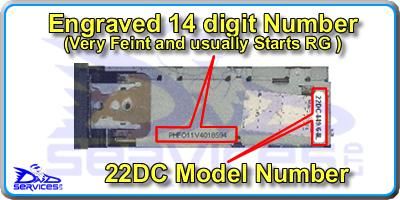
Please note that code entry is only possible when "1 - - -" is shown in the display. If the display continually shows "CODE" then the unit may be codelocked and will need to be left switched on up for up to two hours to reset before another code entry attempt is possible. If it does not reset after this time, or the display shows "ERR" then all of your code entry attempts may have been used up, and the unit will need to be sent to us to be decoded and reset, details of which can be found below.
If you have lost your radio code, the Security Code for this Radio is available NOW using our fully automated INSTANT RADIO CODE service. Once your Radio details have been submitted, your Code will be ready - Instantly !! - No Waiting !!
Removal of the radio is fairly straightforward. The removal tools are inserted into the four round holes at the sides of the fascia until a click is felt. The radio can then be withdrawn and the leads unplugged.
Common Faults:
It is not uncommon for the buttons to appear to "Freeze" on this unit as the flexible circuit behind the detachable fascia is very fragile and easily damaged.
algo=Rg349Mini 22DC349 / 60S
Philips
As originally fitted to :
Mini
Please note that code entry is only possible when "1 - - -" is shown in the display. If the display continually shows "CODE" then the unit may be codelocked and will need to be left switched on up for up to two hours to reset before another code entry attempt is possible. If it does not reset after this time, or the display shows "ERR" then all of your code entry attempts may have been used up, and the unit will need to be sent to us to be decoded and reset, details of which can be found below.
If you have lost your radio code, the Security Code for this Radio is available NOW using our fully automated INSTANT RADIO CODE service. Once your Radio details have been submitted, your Code will be ready - Instantly !! - No Waiting !!
Removal of the radio is fairly straightforward. The removal tools are inserted into the four round holes at the sides of the fascia until a click is felt. The radio can then be withdrawn and the leads unplugged.
Common Faults:
It is not uncommon for the buttons to appear to "Freeze" on this unit as the flexible circuit behind the detachable fascia is very fragile and easily damaged.
boo=1
status=1
mfr_status=1
IDS=Radio / Cassette
Get your code
Your Cart

Cart is empty
Items:
1
Total:
£6.49
Authentication
News
18th September 2025
18th September 2025 - Just hit the 60% Mark
Did you know that our Radio Decode Database now contains over 8200 different makes and models of Radio that we can decode, and that we have just hit the 60% mark of those that can now be decoded online via our fully automated service.
more info...