

Decode - Workshop Service
Smart ECE
Bosch
Code Entry as Follows:
Switch Radio On - Display Shows
" Enter Security Code "
Enter CODE in the order it is read:
For Example, to Enter Code 1234
Press Preset 1 then 2 then 3 then 4
If the correct code number is now shown
Press OK Button " OK " To Enter
Smart ECE
SmartCode Entry as Follows:
Switch Radio On - Display Shows
" Enter Security Code "
Enter CODE in the order it is read:
For Example, to Enter Code 1234
Press Preset 1 then 2 then 3 then 4
If the correct code number is now shown
Press OK Button " OK " To Enter
Smart Radio (S)
SmartCode Entry as Follows:
Switch Radio On - Display Shows
" O : O O "
Switch Radio On - Display Shows
" SAFE " And Then Shows " 1 - - - - "
Press preset " 1 " repeatedly for 1st Digit
Press preset " 2 " repeatedly for 2nd Digit
Press preset " 3 " repeatedly for 3rd Digit
Press preset " 4 " repeatedly for 4th Digit
If the correct code number is now shown
Press the " a " Button (Bottom Right) to Enter
Smart Radio (S)
GrundigCode Entry as Follows:
Switch Radio On - Display Shows
" O : O O "
Switch Radio On - Display Shows
" SAFE " And Then Shows " 1 - - - - "
Press preset " 1 " repeatedly for 1st Digit
Press preset " 2 " repeatedly for 2nd Digit
Press preset " 3 " repeatedly for 3rd Digit
Press preset " 4 " repeatedly for 4th Digit
If the correct code number is now shown
Press the " a " Button (Bottom Right) to Enter
Smart Radio AM CC
SmartCode Entry as Follows:
Switch Radio On - Display Shows
" O : O O "
Switch Radio On - Display Shows
" SAFE " And Then Shows " 1 - - - - "
Press preset " 1 " repeatedly for 1st Digit
Press preset " 2 " repeatedly for 2nd Digit
Press preset " 3 " repeatedly for 3rd Digit
Press preset " 4 " repeatedly for 4th Digit
If the correct code number is now shown
Press the " a " Button (Bottom Right) to Enter
Smart Radio AM CC
GrundigCode Entry as Follows:
Switch Radio On - Display Shows
" O : O O "
Switch Radio On - Display Shows
" SAFE " And Then Shows " 1 - - - - "
Press preset " 1 " repeatedly for 1st Digit
Press preset " 2 " repeatedly for 2nd Digit
Press preset " 3 " repeatedly for 3rd Digit
Press preset " 4 " repeatedly for 4th Digit
If the correct code number is now shown
Press the " a " Button (Bottom Right) to Enter
Smart Radio AM CC
SmartCode Entry as Follows:
Switch Radio On - Display Shows
" O : O O "
Switch Radio On - Display Shows
" SAFE " And Then Shows " 1 - - - - "
Press preset " 1 " repeatedly for 1st Digit
Press preset " 2 " repeatedly for 2nd Digit
Press preset " 3 " repeatedly for 3rd Digit
Press preset " 4 " repeatedly for 4th Digit
If the correct code number is now shown
Press the " a " Button (Bottom Right) to Enter
Smart Radio AM CC
GrundigCode Entry as Follows:
Switch Radio On - Display Shows
" O : O O "
Switch Radio On - Display Shows
" SAFE " And Then Shows " 1 - - - - "
Press preset " 1 " repeatedly for 1st Digit
Press preset " 2 " repeatedly for 2nd Digit
Press preset " 3 " repeatedly for 3rd Digit
Press preset " 4 " repeatedly for 4th Digit
If the correct code number is now shown
Press the " a " Button (Bottom Right) to Enter
Smart Radio CD
GrundigCode Entry as Follows:
Switch Radio On - Display Shows
" SAFE " And Then Shows " 1 - - - - "
Press preset " 1 " repeatedly for 1st Digit
Press preset " 2 " repeatedly for 2nd Digit
Press preset " 3 " repeatedly for 3rd Digit
Press preset " 4 " repeatedly for 4th Digit
If the correct code number is now shown
Press " CD " To Enter
Smart Radio CD
SmartCode Entry as Follows:
Switch Radio On - Display Shows
" SAFE " And Then Shows " 1 - - - - "
Press preset " 1 " repeatedly for 1st Digit
Press preset " 2 " repeatedly for 2nd Digit
Press preset " 3 " repeatedly for 3rd Digit
Press preset " 4 " repeatedly for 4th Digit
If the correct code number is now shown
Press " CD " To Enter
Smart Radio CD
GrundigCode Entry as Follows:
Switch Radio On - Display Shows
" SAFE " And Then Shows " 1 - - - - "
Press preset " 1 " repeatedly for 1st Digit
Press preset " 2 " repeatedly for 2nd Digit
Press preset " 3 " repeatedly for 3rd Digit
Press preset " 4 " repeatedly for 4th Digit
If the correct code number is now shown
Press " CD " To Enter
Smart Radio CD
SmartCode Entry as Follows:
Switch Radio On - Display Shows
" SAFE " And Then Shows " 1 - - - - "
Press preset " 1 " repeatedly for 1st Digit
Press preset " 2 " repeatedly for 2nd Digit
Press preset " 3 " repeatedly for 3rd Digit
Press preset " 4 " repeatedly for 4th Digit
If the correct code number is now shown
Press " CD " To Enter
Smart Radio CD (S)
SmartCode Entry as Follows:
Switch Radio On - Display Shows
" SAFE " And Then Shows " 1 - - - - "
Press preset " 1 " repeatedly for 1st Digit
Press preset " 2 " repeatedly for 2nd Digit
Press preset " 3 " repeatedly for 3rd Digit
Press preset " 4 " repeatedly for 4th Digit
If the correct code number is now shown
Press " CD " To Enter
Smart Radio CD (S)
GrundigCode Entry as Follows:
Switch Radio On - Display Shows
" SAFE " And Then Shows " 1 - - - - "
Press preset " 1 " repeatedly for 1st Digit
Press preset " 2 " repeatedly for 2nd Digit
Press preset " 3 " repeatedly for 3rd Digit
Press preset " 4 " repeatedly for 4th Digit
If the correct code number is now shown
Press " CD " To Enter
Smart Radio CD MRR
GrundigCode Entry as Follows:
Switch Radio On - Display Shows
" SAFE " And Then Shows " 1 - - - - "
Press preset " 1 " repeatedly for 1st Digit
Press preset " 2 " repeatedly for 2nd Digit
Press preset " 3 " repeatedly for 3rd Digit
Press preset " 4 " repeatedly for 4th Digit
If the correct code number is now shown
Press " CD " To Enter
Smart Radio CD MRR
SmartCode Entry as Follows:
Switch Radio On - Display Shows
" SAFE " And Then Shows " 1 - - - - "
Press preset " 1 " repeatedly for 1st Digit
Press preset " 2 " repeatedly for 2nd Digit
Press preset " 3 " repeatedly for 3rd Digit
Press preset " 4 " repeatedly for 4th Digit
If the correct code number is now shown
Press " CD " To Enter
Sony CDX-M1000TF
Sony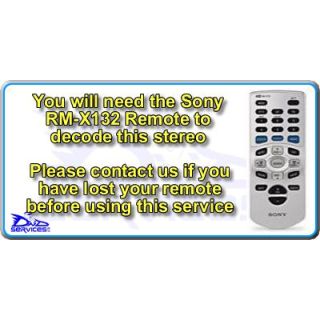
Code Entry as Follows:
Switch Radio On - Display Shows
" Code Input " and Four Blue Squares
Press " DISC + " to Select 1st Digit
Press " SEEK + " To Enter
Press " DISC + " to Select 2nd Digit
Press " SEEK + " To Enter
Press " DISC + " to Select 3rd Digit
Press " SEEK + " To Enter
Press " DISC + " to Select 4th Digit
If the correct code number is now shown
Press " ENTER " To Enter
And the Radio will then Turn On
Sony CDX-M600
SonyCode Entry as Follows:
If you have misplaced your remote control, we will reprogram and disable the code function, so that the radio can be used without the need for it.
Sony CDX-M600R
SonyCode Entry as Follows:
If you have misplaced your remote control, we will reprogram and disable the code function, so that the radio can be used without the need for it.
Sony CDX-M610
SonyCode Entry as Follows:
If you have misplaced your remote control, we will reprogram and disable the code function, so that the radio can be used without the need for it.
Sony CDX-M610R
SonyCode Entry as Follows:
If you have misplaced your remote control, we will reprogram and disable the code function, so that the radio can be used without the need for it.
Sony CDX-M630
SonyCode Entry as Follows:
If you have misplaced your remote control, we will reprogram and disable the code function, so that the radio can be used without the need for it.
Sony CDX-M650R
SonyCode Entry as Follows:
If you have misplaced your remote control, we will reprogram and disable the code function, so that the radio can be used without the need for it.
Sony CDX-M700R
SonyCode Entry as Follows:
If you have misplaced your remote control, we will reprogram and disable the code function, so that the radio can be used without the need for it.
Your Cart
