

VDO Database Decode - Instant Radio Code Service
Renault RENRDW270-10
VDO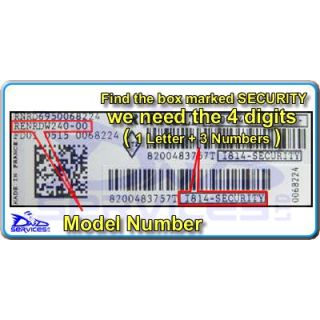
Code Entry as Follows:
Switch Radio On - Display Shows
" CODE "
Then " 0000 " with the 1st digit flashing
Rotate " Thumbwheel " For Correct Digit
Press " ¬ " On The Stalk Control To Enter
Rotate " Thumbwheel " For Correct Digit
Press " ¬ " On The Stalk Control To Enter
Rotate " Thumbwheel " For Correct Digit
Press " ¬ " On The Stalk Control To Enter
Rotate " Thumbwheel " For Correct Digit
If the correct code number is now shown
Press And Hold " ¬ " Until A Beep Is Heard
Renault RENRDW270-70
VDOCode Entry as Follows:
Switch Radio On - Display Shows
" CODE " Then " 0000 "
Press preset " 1 " repeatedly for 1st Digit
Press preset " 2 " repeatedly for 2nd Digit
Press preset " 3 " repeatedly for 3rd Digit
Press preset " 4 " repeatedly for 4th Digit
If the correct code number is now shown
Press and hold preset " 6 " To Enter
Renault RENRDW302-71
VDOCode Entry as Follows:
Switch Radio On - Display Shows
" CODE " Then " 0000 "
Press preset " 1 " repeatedly for 1st Digit
Press preset " 2 " repeatedly for 2nd Digit
Press preset " 3 " repeatedly for 3rd Digit
Press preset " 4 " repeatedly for 4th Digit
If the correct code number is now shown
Press and hold preset " 6 " To Enter
Renault RENRDW323-09
VDOCode Entry as Follows:
Switch Radio On - Display Shows
" CODE " Then " 0000 "
Press preset " 1 " repeatedly for 1st Digit
Press preset " 2 " repeatedly for 2nd Digit
Press preset " 3 " repeatedly for 3rd Digit
Press preset " 4 " repeatedly for 4th Digit
If the correct code number is now shown
Press and hold preset " 6 " To Enter
Renault RENRDW341-10
VDO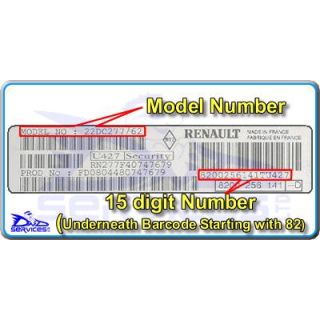
Code Entry as Follows:
Switch Radio On - Display Shows
" CODE "
Then " 0000 " with the 1st digit flashing
Rotate " Thumbwheel " For Correct Digit
Press " ¬ " On The Stalk Control To Enter
Rotate " Thumbwheel " For Correct Digit
Press " ¬ " On The Stalk Control To Enter
Rotate " Thumbwheel " For Correct Digit
Press " ¬ " On The Stalk Control To Enter
Rotate " Thumbwheel " For Correct Digit
If the correct code number is now shown
Press And Hold " ¬ " Until A Beep Is Heard
Renault RENRDW344-00
VDOCode Entry as Follows:
Switch Radio On - Display Shows
" CODE " Then " 0000 "
Press preset " 1 " repeatedly for 1st Digit
Press preset " 2 " repeatedly for 2nd Digit
Press preset " 3 " repeatedly for 3rd Digit
Press preset " 4 " repeatedly for 4th Digit
If the correct code number is now shown
Press and hold preset " 6 " To Enter
Renault RENRDW346-10
VDOCode Entry as Follows:
Switch Radio On - Display Shows
" CODE " Then " 0000 "
Press preset " 1 " repeatedly for 1st Digit
Press preset " 2 " repeatedly for 2nd Digit
Press preset " 3 " repeatedly for 3rd Digit
Press preset " 4 " repeatedly for 4th Digit
If the correct code number is now shown
Press and hold preset " 6 " To Enter
Renault RENRNC400-00
VDOCode Entry as Follows:
Sorry, We do not have information on Code Entry Procedure
Please refer to your handbook
Renault RENRNC470-10
VDOCode Entry as Follows:
Sorry, We do not have information on Code Entry Procedure
Please refer to your handbook
Renault RENRTD200-00
VDOCode Entry as Follows:
Sorry, we do not have information on the code entry procedure.
Please consult your vehicle handbook.
Renault TUNER List
VDOCode Entry as Follows:
Switch Radio On - Display Shows
" CODE "
Then " 0000 " with the 1st digit flashing
Rotate " Thumbwheel " For Correct Digit
Press " ¬ " On The Stalk Control To Enter
Rotate " Thumbwheel " For Correct Digit
Press " ¬ " On The Stalk Control To Enter
Rotate " Thumbwheel " For Correct Digit
Press " ¬ " On The Stalk Control To Enter
Rotate " Thumbwheel " For Correct Digit
If the correct code number is now shown
Press And Hold " ¬ " Until A Beep Is Heard
Renault TUNER List
VDOCode Entry as Follows:
Switch Radio On - Display Shows
" CODE "
Then " 0000 " with the 1st digit flashing
Rotate " Thumbwheel " For Correct Digit
Press " ¬ " On The Stalk Control To Enter
Rotate " Thumbwheel " For Correct Digit
Press " ¬ " On The Stalk Control To Enter
Rotate " Thumbwheel " For Correct Digit
Press " ¬ " On The Stalk Control To Enter
Rotate " Thumbwheel " For Correct Digit
If the correct code number is now shown
Press And Hold " ¬ " Until A Beep Is Heard
Renault UPDATE List
VDOCode Entry as Follows:
Switch Radio On - Display Shows
" CODE " Then " 0000 "
Press preset " 1 " repeatedly for 1st Digit
Press preset " 2 " repeatedly for 2nd Digit
Press preset " 3 " repeatedly for 3rd Digit
Press preset " 4 " repeatedly for 4th Digit
If the correct code number is now shown
Press and hold preset " 6 " To Enter
Renault UPDATE List
VDOCode Entry as Follows:
Switch Radio On - Display Shows
" CODE " Then " 0000 "
Press preset " 1 " repeatedly for 1st Digit
Press preset " 2 " repeatedly for 2nd Digit
Press preset " 3 " repeatedly for 3rd Digit
Press preset " 4 " repeatedly for 4th Digit
If the correct code number is now shown
Press and hold preset " 6 " To Enter
Renault UPDATE List
VDOCode Entry as Follows:
Switch Radio On - Display Shows
" CODE " Then " 0000 "
Press preset " 1 " repeatedly for 1st Digit
Press preset " 2 " repeatedly for 2nd Digit
Press preset " 3 " repeatedly for 3rd Digit
Press preset " 4 " repeatedly for 4th Digit
If the correct code number is now shown
Press and hold preset " 6 " To Enter
Renault UPDATE List
VDOCode Entry as Follows:
Switch Radio On - Display Shows
" CODE " Then " 0000 "
Press preset " 1 " repeatedly for 1st Digit
Press preset " 2 " repeatedly for 2nd Digit
Press preset " 3 " repeatedly for 3rd Digit
Press preset " 4 " repeatedly for 4th Digit
If the correct code number is now shown
Press and hold preset " 6 " To Enter
Renault UPDATE List
VDOCode Entry as Follows:
Switch Radio On - Display Shows
" CODE " Then " 0000 "
Press preset " 1 " repeatedly for 1st Digit
Press preset " 2 " repeatedly for 2nd Digit
Press preset " 3 " repeatedly for 3rd Digit
Press preset " 4 " repeatedly for 4th Digit
If the correct code number is now shown
Press and hold preset " 6 " To Enter
Renault UPDATE List
VDOCode Entry as Follows:
Switch Radio On - Display Shows
" CODE " Then " 0000 "
Press preset " 1 " repeatedly for 1st Digit
Press preset " 2 " repeatedly for 2nd Digit
Press preset " 3 " repeatedly for 3rd Digit
Press preset " 4 " repeatedly for 4th Digit
If the correct code number is now shown
Press and hold preset " 6 " To Enter
Renault UPDATE List
VDOCode Entry as Follows:
Switch Radio On - Display Shows
" CODE " Then " 0000 "
Press preset " 1 " repeatedly for 1st Digit
Press preset " 2 " repeatedly for 2nd Digit
Press preset " 3 " repeatedly for 3rd Digit
Press preset " 4 " repeatedly for 4th Digit
If the correct code number is now shown
Press and hold preset " 6 " To Enter
Renault UPDATE List
VDOCode Entry as Follows:
Switch Radio On - Display Shows
" CODE " Then " 0000 "
Press preset " 1 " repeatedly for 1st Digit
Press preset " 2 " repeatedly for 2nd Digit
Press preset " 3 " repeatedly for 3rd Digit
Press preset " 4 " repeatedly for 4th Digit
If the correct code number is now shown
Press and hold preset " 6 " To Enter
Renault UPDATE List
VDOCode Entry as Follows:
Switch Radio On - Display Shows
" CODE " Then " 0000 "
Press preset " 1 " repeatedly for 1st Digit
Press preset " 2 " repeatedly for 2nd Digit
Press preset " 3 " repeatedly for 3rd Digit
Press preset " 4 " repeatedly for 4th Digit
If the correct code number is now shown
Press and hold preset " 6 " To Enter
Renault UPDATE List
VDOCode Entry as Follows:
Switch Radio On - Display Shows
" CODE "
Then " 0000 " with the 1st digit flashing
Rotate " Thumbwheel " For Correct Digit
Press " ¬ " On The Stalk Control To Enter
Rotate " Thumbwheel " For Correct Digit
Press " ¬ " On The Stalk Control To Enter
Rotate " Thumbwheel " For Correct Digit
Press " ¬ " On The Stalk Control To Enter
Rotate " Thumbwheel " For Correct Digit
If the correct code number is now shown
Press And Hold " ¬ " Until A Beep Is Heard
Renault UPDATE List
VDOCode Entry as Follows:
Switch Radio On - Display Shows
" CODE " Then " 0000 "
Press preset " 1 " repeatedly for 1st Digit
Press preset " 2 " repeatedly for 2nd Digit
Press preset " 3 " repeatedly for 3rd Digit
Press preset " 4 " repeatedly for 4th Digit
If the correct code number is now shown
Press and hold preset " 6 " To Enter
Renault UPDATE List
VDOCode Entry as Follows:
Switch Radio On - Display Shows
" CODE "
Then " 0000 " with the 1st digit flashing
Rotate " Thumbwheel " For Correct Digit
Press " ¬ " On The Stalk Control To Enter
Rotate " Thumbwheel " For Correct Digit
Press " ¬ " On The Stalk Control To Enter
Rotate " Thumbwheel " For Correct Digit
Press " ¬ " On The Stalk Control To Enter
Rotate " Thumbwheel " For Correct Digit
If the correct code number is now shown
Press And Hold " ¬ " Until A Beep Is Heard
Your Cart
